
NVIDIA Triton Inference Server: TensorRT-LLM, GPU Serving and Production AI Inference
Comprehensive overview of NVIDIA Triton Inference Server covering scalable AI model serving, TensorRT and TensorRT-LLM integration, dynamic batching, multi-model inference, GPU scheduling, Kubernetes deployment, and high-performance production AI serving architectures.

NVIDIA NeMo and Enterprise AI Platforms: Distributed LLM Training, RAG and TensorRT-LLM
NVIDIA NGC Catalog: GPU Optimized Containers, AI Models and Enterprise AI Infrastructure
NVIDIA Triton Inference Server 🐳
Triton Inference Server is a high-performance model serving platform for deploying AI models in production.
It is designed for:
- scalable inference
- multi-model serving
- GPU acceleration
- low-latency AI APIs
- enterprise AI deployment
Triton can serve:
- LLMs
- computer vision models
- speech models
- recommendation systems
- ensemble pipelines
Why Triton Exists
Running AI models in production is difficult because of:
- batching
- GPU scheduling
- concurrency
- scaling
- memory management
- multi-model orchestration
Triton handles these automatically.
Why Triton Matters
Modern AI systems need:
- high throughput
- low latency
- GPU efficiency
- scalable serving
- production observability
Triton provides all of these in a production-grade inference platform.
What Triton Does
Triton acts like:
Production web server for AI models
Instead of serving HTML pages:
- it serves model inference requests.
# Step 1: Create the example model repository
git clone -b r26.04 https://github.com/triton-inference-server/server.git
cd server/docs/examples
./fetch_models.sh

# Step 2: Launch triton from the NGC Triton container
docker run --gpus=1 --rm --net=host -v ${PWD}/model_repository:/models nvcr.io/nvidia/tritonserver:26.04-py3 tritonserver --model-repository=/models --model-control-mode explicit --load-model densenet_onnx

# Step 3: Sending an Inference Request
# In a separate console, launch the image_client example from the NGC Triton SDK container
docker run -it --rm --net=host nvcr.io/nvidia/tritonserver:26.04-py3-sdk /workspace/install/bin/image_client -m densenet_onnx -c 3 -s INCEPTION /workspace/images/mug.jpg

# Inference should return the following
Image '/workspace/images/mug.jpg':
    15.346230 (504) = COFFEE MUG
    13.224326 (968) = CUP
    10.422965 (505) = COFFEEPOT
High-Level Triton Workflow
flowchart TD

    A["Client Requests"]
        --> B["Triton Inference Server 🐳"]

    B --> C["TensorRT 🖲 / PyTorch / ONNX"]

    C --> D["NVIDIA GPUs 🧮"]

    D --> E["Inference Response 💬"]
Example: Triton + TensorRT-LLM
Modern LLM stack:
- TensorRT: Optimizes a model
- Triton: Serves optimized models at scale
flowchart TD
A["Client Requests 🙍🏻♂️"]
--> B["Triton Server 🐳"]
B --> C["TensorRT-LLM 🖲"]
C --> D["NVIDIA GPUs 🧮"]
D --> E["Generated Tokens 💬"]
Triton APIs
Triton supports:
- HTTP
- gRPC
- streaming inference
Example:
import tritonclient.http as httpclient
Supported Backends
Triton supports many runtimes.
| Backend | Purpose |
|---|---|
| TensorRT | Optimized NVIDIA inference |
| PyTorch | TorchScript inference |
| ONNX Runtime | Cross-platform inference |
| TensorFlow | TensorFlow serving |
| Python backend | Custom Python logic |
| vLLM | Optimized LLM serving |
| TensorRT-LLM | High-performance LLM inference |
Triton vs Traditional APIs
| Feature | Traditional API Server | Triton |
|---|---|---|
| GPU-aware | NO | YES |
| Dynamic batching | NO | YES |
| Multi-model serving | Limited | Excellent |
| TensorRT integration | NO | Native |
| AI inference optimization | Limited | Excellent |
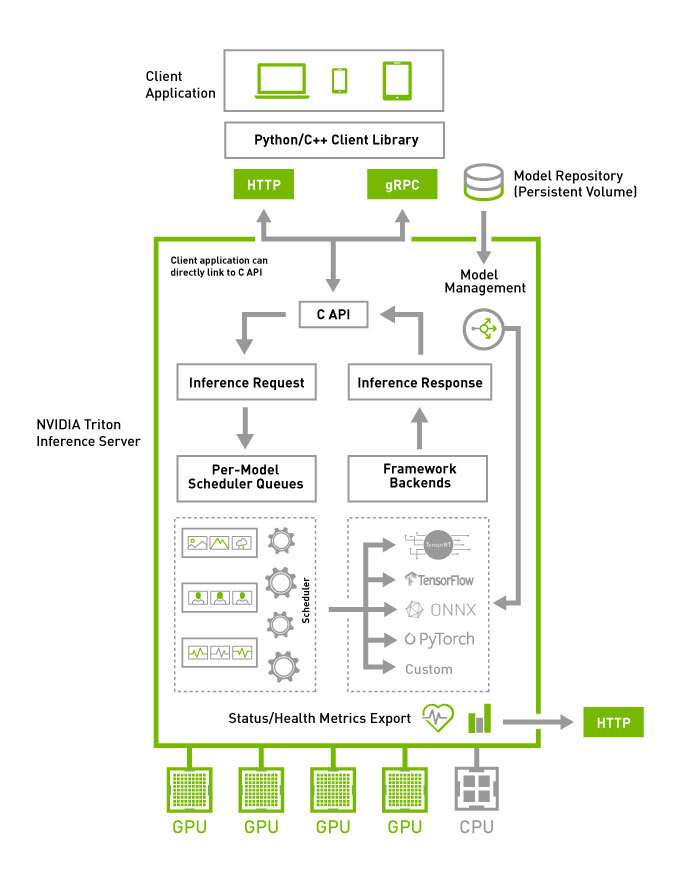
Triton Architecture
Triton Ecosystem
| Component | Role |
|---|---|
| CUDA | GPU compute |
| NCCL | Multi-GPU communication |
| TensorRT | Optimized inference |
| TensorRT-LLM | LLM optimization |
| Triton | Production serving |
| Kubernetes | Orchestration |
flowchart TD

    A["HTTP / gRPC Requests"]
        --> B["Triton Server 🐳"]

    B --> C["Scheduler 🕘"]

    C --> D["Model Backend"]

    D --> E["CUDA Runtime"]

    E --> F["NVIDIA GPUs"]
Dynamic Batching
One of Triton’s biggest features.
Instead of processing requests individually:
Request 1
Request 2
Request 3
Triton automatically combines them:
Single GPU batch
Benefits:
- higher GPU utilization
- better throughput
- lower cost
Dynamic Batching Example
flowchart LR

    A["Request 1"]
    B["Request 2"]
    C["Request 3"]

    A --> D["Triton Dynamic Batch"]

    B --> D
    C --> D

    D --> E["Single GPU Inference"]
Concurrent Model Execution
Triton can run:
- multiple models
- multiple versions
- multiple GPUs
simultaneously.
Example:
- recommendation model
- embedding model
- reranker
- LLM
all served together.
Model Repository
Triton loads models from a structured repository.
Example:
models/
 ├── llama/
 │    ├── 1/
 │    └── config.pbtxt
 ├── reranker/
 └── embedding_model/
Triton Scheduling
Triton optimizes:
- batching
- queueing
- GPU assignment
- parallel execution
- memory reuse
This helps maximize:
- throughput
- GPU utilization
- latency efficiency
Triton + Kubernetes
Triton is commonly deployed on:
- Kubernetes
- GPU clusters
- cloud AI platforms
Example stack:
flowchart TD

    A["Kubernetes"]
        --> B["Triton Pods 🐳"]

    B --> C["TensorRT-LLM"]

    C --> D["GPU Nodes"]
Typical Production Stack
flowchart TD

    A["PyTorch / NeMo Model"]
        --> B["ONNX"]

    B --> C["TensorRT-LLM"]

    C --> D["Triton Inference Server"]

    D --> E["Production APIs"]
Ensemble Models
Triton can chain multiple models into pipelines.
Example:
flowchart TD

    A["Input Text"]
        --> B["Embedding Model"]

    B --> C["Retriever"]

    C --> D["LLM"]

    D --> E["Final Response"]
This is useful for:
- RAG systems
- multimodal AI
- AI agents
Triton + Monitoring
Triton exposes:
- Prometheus metrics
- GPU metrics
- latency metrics
- throughput metrics
Important for:
- observability
- autoscaling
- production reliability
Common Triton Use Cases
- LLM serving
- Chatbots
- RAG systems
- Recommendation engines
- Computer vision APIs
- Speech AI
- Real-time inference systems