

Read, generate, and modify configuration - 18%
- 8a Demonstrate use of
variablesandoutputs - 8b Describe secure secret injection best practice
- 8c Understand the use of
collectionand structural types - 8d Create and differentiate
resourceanddataconfiguration - 8e Use resource addressing and resource parameters to connect resources together
- 8f Use HCL and
Terraform functionsto write configuration - 8g Describe built-in
dependency management(order of execution based)
Variables
terraform apply -var "instance_name=YetAnotherName"
Local Variable
Used to define local environment configurations or constants
- keep the number of local variables to a minimum
- Instead use Input Vars as parameter to resource/module
Example
    locals {
    project_name       = "Terraforming"
    default_region     = "us-east-1a"
    common_tags = {
        Terraform   = "true"
        Environment = "dev"
    }}
Input Vraiables
Used to assign dynamic values to resource attributes as Input
- input variables allows to pass values before the code execution.
- ususllay stored in input.tf file
example:
variable "vpc_name" {
    description = "Name of VPC"
    type        = string
    default     = "module-vpc"
}
Variables can be overridden using
-
Passing the values in CLI as -var argument eg
terraform plan -var "ami=test" -var "type=t2.nano" -
Using
.tfvarsfile to set variable values explicitly egterraform plan -var-file prod.tfvars- file with extension
.auto.tfvarswill autoapply without -varfile argument
- file with extension
Supported Variables types
Primitive Types: string, number & bool
object and tuple
1. Strings
variable "string_type" {
description = "This is a variable of type string"
type        = string
default     = "Default string value for this variable"
}
heredoc style format
variable "string_heredoc_type" {
    description = "This is a variable of type string"
    type        = string
    default     = <<EOF
    Hello World!
    EOF
}
2. Number
variable "number_type" {
    description = "This is a variable of type number"
    type        = number
    default     = 42
    }
3. Boolean
variable "boolean_type" {
    description = "This is a variable of type bool"
    type        = bool
    default     = true
}
Complex Type
1. Structural Types: object and tuple
4. Object
variable "object_type" {
    description = "This is a variable of type object"
    type = object({
    name = string
    age  = number
    enabled = bool
    })
    default = {
        name    = "John Doe"
        age     = 30
        enabled = true
    }
}
8. Tuple: fixed-length ORDERED collection of DIFFERENT data types.
variable "tuple_type" {
    description = "This is a variable of type tuple"
    type        = tuple([string, number, bool])
    default     = ["item1", 42, true]
}
2. Collection Types: list, map, and set
5. List: Collection of SIMILAR items/ objects
variable "list_type" {
    description = "This is a variable of type list"
    type        = list(string)
    default     = ["string1", "string2", "string3"]
}
List of Objects
variable "list_of_objects" {
    description = "This is a variable of type List of objects"
    type = list(object({
        name = string,
        cidr = string
    }))
    default = [{
        name = "Subnet A",
        cidr = "10.10.1.0/24"},
        {name = "Subnet B",
        cidr = "10.10.2.0/24"},
        {name = "Subnet C",
        cidr = "10.10.3.0/24"}]
}
6. Map: Key Value pair
variable "map_type" {
    description = "This is a variable of type map"
    type        = map(string)
    default     = {
        key1 = "value1"
        key2 = "value2"
    }
}
Map of Objects
variable "map_of_objects" {
    description = "This is a variable of type Map of objects"
    type = map(object({
        name = string,
        cidr = string
    }))
    default = {
        "subnet_a" = {
        name = "Subnet A",
        cidr = "10.10.1.0/24"},
    "subnet_b" = {
        name = "Subnet B",
        cidr = "10.10.2.0/24"},
    "subnet_c" = {
        name = "Subnet C",
        cidr = "10.10.3.0/24"}
    }}
7. Set: UNORDERED collection of UNIQUE values(no duplicate possible)
variable "set_example" {
    description = "This is a variable of type set"
    type        = set(string)
    default     = ["item1", "item2", "item3"]
}
Dynamic Types: The "any" Constraint
serves as a placeholder for a type yet to be decided.
any is not itself a type: when interpreting a value against a type constraint containing any, Terraform will attempt
to find a single actual type that could replace the any keyword to produce a valid result.
variable "settings" {
 type = any
}
Using tfvars & *.auto.tfvars file
Used to define varaibles used in differeent env eg:
terraform apply -var-file="testing.tfvars"
Terraform automatically loads file with names:
- exactly
terraform.tfvarsorterraform.tfvars.json. - ending in
.auto.tfvarsor.auto.tfvars.json.
variable.tf vs variable.tfvars
variable.tfare files where all variables are declared; these might or might not have a default value.variable.tfvarsare files where the variables are provided/assigned a value.
Environment Variables
| command | use |
|---|---|
export TF_VAR_ami=ami-0d26eb3972b7f8c96 | set tf env variable as fallback if variable values are not found elsewhere. |
export TF_LOG=trace | Enable all Logging to TRACE, DEBUG, INFO, WARN or ERROR |
export TF_LOG_CORE=trace | Enable subset core Logging to TRACE, DEBUG, INFO, WARN or ERROR |
export TF_LOG_PROVIDER =trace | Enable subset provider Logging to TRACE, DEBUG, INFO, WARN or ERROR |
export TF_LOG=off | Turn off logging |
export TF_LOG_PATHG=./terraform.log | Persisist logs to local file system |
TF_DATA_DIR | changes the location where Terrform keep .terraform |
TF_WORKSPACE=your_workspace | select a workspace |
TF_REGISTRY_DISCOVERY_RETRY | configure the max number of request retries |
TF_REGISTRY_CLIENT_TIMEOUT=15 | default client timeout for requests to the remote registry is 10s. |
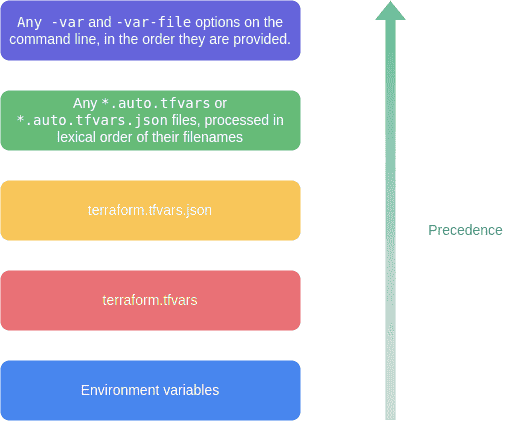
Variable precedence
high priority variable overrides low priority one(high to low)
-varand-var-fileoptions on the command line, in the order they are provided.- .
*.auto.tfvarsor*.auto.tfvars.jsonfiles, processed in lexical order of their filenames. terraform.tfvars.jsonfileterraform.tfvarsfileEnvironmentvariables
Output Variables
output "instance_ip_addr" {
 value = aws_instance.server.private_ip
}
Meta-Argument
count
resource "aws_instance" "server" {
    count = 4 # create four similar EC2 instances
    ami           = "ami-a1b2c3d4"
    instance_type = "t2.micro"
    tags = {
        Name = "Server ${count.index}"
}}
for_each
- each.key — The map key
- each.value — The map value
for each
module "bucket" {
    for_each = toset(["assets", "media"])
    source   = "./publish_bucket"
    name     = "${each.key}_bucket"
}
Splat Expressions
If var.list is a list of objects that all have an attribute id, then a list of the ids could be produced with the following for expression:
[for o in var.list : o.id]
This is equivalent to the following splat expression:
var.list[*].id
lifecycle
Available for all resource blocks
create_before_destroyprevent_destroyignore_changesreplace_triggered_by.
lifecycle
resource "azurerm_resource_group" "example" {
    lifecycle {
        create_before_destroy = true
    }}
depends_on
Handle hidden resource or module dependencies that Terraform cannot automatically infer.
resource "aws_instance" "example" {

    # Terraform can infer from this that the instance profile must
    # be created before the EC2 instance.

    iam_instance_profile = aws_iam_instance_profile.example

    # However, if software running in this EC2 instance needs access  to the S3 API in order to boot properly, there is also a "hidden"
    # dependency on the aws_iam_role_policy that Terraform cannot
    # automatically infer, so it must be declared explicitly:

    depends_on = [
        aws_iam_role_policy.example
    ]
}