TF State & Backend Management
Learn how to implement, manage, and maintain TF state using backends. Best practices for safe, collaborative, and scalable infrastructure management.
TF State & Backend Management
Implement and maintain state 16%
Objective
- 7a Describe default
localbackend - 7b Describe
state locking - 7c Handle
backendand cloud integration authentication methods - 7d Differentiate
remote state backendoptions - 7e Manage
resource driftand Terraform state - 7f Describe
backendblock and cloud integration in configuration - 7g Understand
secret managementin state files
State ( terraform.tfstate)
Track your infrastructure
Terraform keeps track of your real infrastructure in a state file, which acts as a source of truth for your environment.
- Terraform uses the state file to determine the changes to make to your infrastructure so that it will match your configuration.
- The command
terraform force-unlockManually unlock the state for the defined configuration.
Protect Sensitive Data in State
TF state can contain sensitive data, depending on the resources in use and your definition of "sensitive."
- When using
local state, state is stored in plain-text JSON files.
When using remote state, state is only ever held in memory when used by Terraform. It may be encrypted at rest
using:
-
The
S3 backendsupportsencryption at restwhen the encrypt option is enabled. IAM policies and logging can be used to identify any invalid access. Requests for the state go over aTLSconnection. -
Terraform Cloudalwaysencryptsstate at rest and protects it withTLSin transit.- Terraform Cloud also knows the identity of the user requesting state and maintains a history of state changes to control access and track activity along with detailed audit logging in TF Eneterprise.
State Manipulation
| command | use |
|---|---|
terraform state list |
List all resources in current state |
terraform state show aws_instance.my_ec2 |
show detail about a resource in instance |
terraform show -json |
provide human-readable JSON output from a state or plan file. |
terraform import aws_instance.foo i-abcd1234 |
import AWS instance into the aws_instance resource named foo |
terraform state rm aws_instance.my_ec2 |
remove a resource from state |
terraform state pull > terrformstate.tfstate |
pull current remote state to local state file |
terraform state push terrformstate.tfstate |
update remote state from local state file (takes the local file as an argument, not a redirect) |
terraform state mv aws_iam_role.my_ssorole module.custom_module |
rename resource, move a resource to module. move a moduel to another module |
terraform state replace-provider hashicorp/aws registry.custom.com/aws |
change resource provider |
terraform taint(deprecated in v0.15.2) |
When particular object has become degraded or damaged. Terraform will propose to replace it in the next plan you create. |
terraform refresh(deprecated in v0.15.4) |
Reads the current settings from all managed remote objects and updates the Terraform state to match. |
terraform apply -refresh-only -auto-approve |
Same as refresh v0.15.4+ |
| --- |
Backend
A backend defines where Terraform stores its state data files.
-
A configuration can only provide one
backendblock. -
A
backendblock cannot refer to named values (like input variables, locals, or data source attributes). -
Terraform Cloudautomatically manages state in the workspaces. If your configuration includes acloudblock, it cannot include abackendblock.
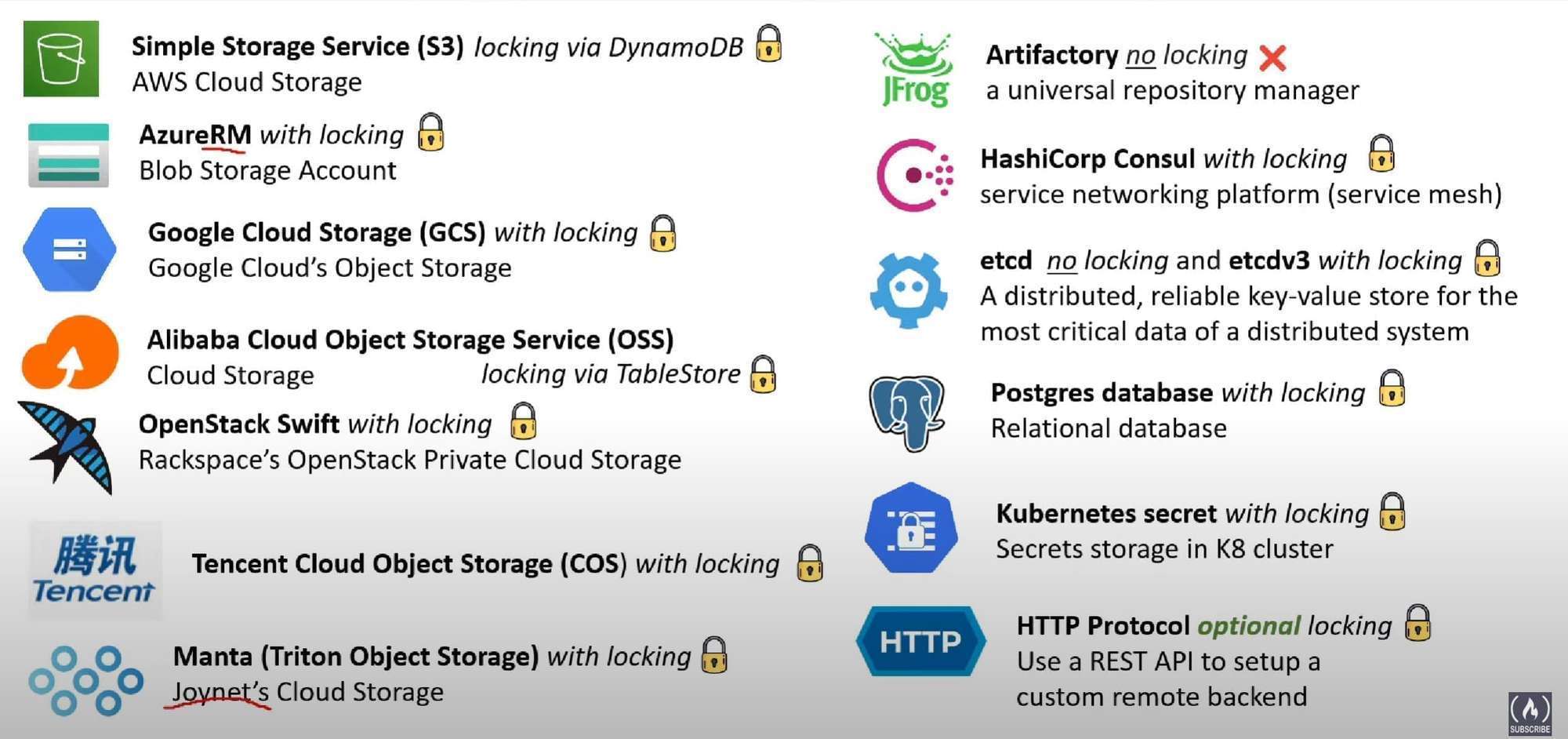
Terraform v1.4.x supports the following backend types:-
- local
- remote
- consul
- s3
- http
- kubernetes
- Azure Resource Manager(azurerm)
- Tencent Cloud Object Storage (COS).
- Google Cloud Storage (GCS)
- Alibaba Cloud Stores Object Storage Service (OSS)
- Postgres database (pg)
When you change a backend’s configuration, you must run terraform init again to validate and configure the backend
before you can perform any plans, applies, or state operations.
-
Backend types support state locking:- local, remote, azurerm, consul, cos, gcs, http, kubernetes, oss, pg, s3, etcdv3, manta, swift
-
Backend types doesn’t support state locking:-
artifactory, etcd
Terraform v1.2.x also supports following backend types:- artifactory, etcd, etcdv3, manta, swift
Local Backend(
terraform.tfstate)
By default, Terraform uses a backend called local, which stores state as a local file on disk
- by default store state in "
terraform.tfstate" relative to the root module.
Supported Local Backend Configuration variables
-
path- (Optional) The path to thetfstatefile. -
workspace_dir- (Optional) The path to non-default workspaces. Command Line Argumentsterraform { backend "local" { # define local backend path = "relative/path/to/terraform.tfstate" }}
Remote Backend (legacy — see note below)
Note: Since Terraform 1.1, the recommended way to connect to Terraform Cloud (now HCP Terraform) is the dedicated
cloudblock, notbackend "remote". Thebackend "remote"syntax below still works but is the older approach — acloudblock uses identicalorganization/workspacesarguments, just nested undercloud { }instead ofbackend "remote" { }, and (per the earlier note) a configuration can't mix acloudblock with abackendblock.
When using full remote operations, operations like terraform plan or terraform apply can be executed in Terraform Cloud's run environment, with log output streaming to the local terminal. Remote plans and applies use variable values from the associated Terraform Cloud workspace.
You can also use Terraform Cloud with local operations, in which case only state is stored in the Terraform Cloud backend.
  # Legacy syntax (still works, but prefer the `cloud` block for new configs)
  terraform {
    backend "remote" {
      organization = "example_corp"

      workspaces {
        name = "my-app-prod"
      }
    }
  }
Modern equivalent using the cloud block:
  terraform {
    cloud {
      organization = "example_corp"

      workspaces {
        name = "my-app-prod"
      }
    }
  }
Production Remote Backend: S3 + DynamoDB
The most common production setup for AWS teams — S3 stores the state file, DynamoDB provides state locking:
# backend.tf
terraform {
  backend "s3" {
    bucket         = "my-terraform-state"
    key            = "prod/networking/terraform.tfstate"
    region         = "us-east-1"
    encrypt        = true           # encrypt state at rest using SSE-S3

    dynamodb_table = "terraform-lock"  # DynamoDB table for state locking
  }
}
Create the prerequisite resources (bootstrap — do this once manually or with a separate Terraform config):
# S3 bucket for state
aws s3api create-bucket \
  --bucket my-terraform-state \
  --region us-east-1

# Enable versioning (allows state recovery)
aws s3api put-bucket-versioning \
  --bucket my-terraform-state \
  --versioning-configuration Status=Enabled

# DynamoDB table for locking (LockID is the required partition key name)
aws dynamodb create-table \
  --table-name terraform-lock \
  --attribute-definitions AttributeName=LockID,AttributeType=S \
  --key-schema AttributeName=LockID,KeyType=HASH \
  --billing-mode PAY_PER_REQUEST
State locking prevents two engineers from running terraform apply simultaneously and corrupting the state file. When one apply is running, the DynamoDB item exists with details of who holds the lock. A second apply will fail immediately with "Error acquiring the state lock."
Resource Drift
Drift is when real-world infrastructure diverges from what Terraform's state file records — usually because someone made a manual change outside Terraform.
Example: A developer manually adds an ingress rule to a Security Group in the AWS Console. Terraform's state still shows the old rules. The config and state agree — but reality doesn't match.
flowchart LR
  Config[".tf Config\n(desired state)"]
  State["State File\n(last known state)"]
  Real["Real Infrastructure\n(actual state)"]

  Config -- "matches" --> State
  Real -- "DRIFTED ≠" --> State
Detecting drift
# Refresh state from real infrastructure — shows what changed
terraform apply -refresh-only

# Preview what refresh would update
terraform plan -refresh-only
-refresh-only updates the state to match reality WITHOUT making any infrastructure changes. After reviewing, you can either:
- Accept the drift: run
terraform apply -refresh-onlyto update state; then update your.tfconfig to match - Reject the drift: run
terraform applyto revert the manual change and restore what the config specifies
Preventing drift with ignore_changes
If certain attributes legitimately change outside Terraform (e.g., an auto-scaling group's desired capacity), tell Terraform to ignore them:
resource "aws_autoscaling_group" "web" {
  min_size = 2
  max_size = 10

  lifecycle {
    ignore_changes = [desired_capacity]  # managed by auto-scaling, not Terraform
  }
}
State File Anatomy
The state file is plain JSON. Understanding its structure helps when debugging:
{
  "version": 4,
  "terraform_version": "1.7.0",
  "serial": 12,
  "lineage": "a1b2c3d4-...",
  "outputs": {
    "instance_ip": { "value": "10.0.1.50", "type": "string" }
  },
  "resources": [
    {
      "mode": "managed",
      "type": "aws_instance",
      "name": "web",
      "provider": "provider[\"registry.terraform.io/hashicorp/aws\"]",
      "instances": [
        {
          "schema_version": 1,
          "attributes": {
            "id": "i-0abc123def456",
            "ami": "ami-0c55b159cbfafe1f0",
            "instance_type": "t3.micro",
            "private_ip": "10.0.1.50",
            "tags": { "Name": "web-server" }
          }
        }
      ]
    }
  ]
}
Key fields:
serial— increments on every apply; used for conflict detection (stale state writes fail)lineage— unique ID for this state file; prevents accidentally merging state from different configsinstances[].attributes— the real-world values Terraform recorded after the last apply
Never edit the state file by hand. Use
terraform state mv,terraform state rm, andterraform importinstead. Manual edits can corruptserial/lineageand cause silent data loss.
Cross-Workspace State Access
Access outputs from another workspace's state using the terraform_remote_state data source:
# In your app config, read the VPC ID provisioned by the networking team's config
data "terraform_remote_state" "networking" {
  backend = "s3"
  config = {
    bucket = "my-terraform-state"
    key    = "prod/networking/terraform.tfstate"
    region = "us-east-1"
  }
}

resource "aws_instance" "app" {
  subnet_id = data.terraform_remote_state.networking.outputs.private_subnet_id
}
Related Posts
- IaC Concepts & TF Overview — why state is central to Terraform's declarative model; idempotency and drift explained
- Terraform Core Workflow & Commands — the
terraform apply -refresh-onlyandterraform statecommands used to manage drift - TF Cloud Capabilities & Workflow — Terraform Cloud as an alternative to S3+DynamoDB for remote state and state locking